gc.add(gstr, 50, 60);
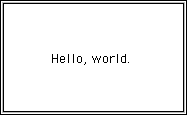
This code creates a GString containing the string "Hello, world." and installs it in the GCanvas so that its origin is at the point (50, 60), as shown in the figure to the right.
|
|||||||
| PREV CLASS NEXT CLASS | FRAMES NO FRAMES | ||||||
| SUMMARY: FIELD | CONSTR | METHOD | DETAIL: FIELD | CONSTR | METHOD | ||||||
java.lang.Object
  |
  +--acm.graphics.GObject
        |
        +--acm.graphics.GString
public class GString extends GObjectThe GString class is a graphical object whose appearance consists of a text string.
|
To use the GString class, the first
step is to construct a new GString
object and add it to an existing GCanvas (assumed here to be
stored in the variable gc), as follows:
gc.add(gstr, 50, 60); This code creates a GString containing the string "Hello, world." and installs it in the GCanvas so that its origin is at the point (50, 60), as shown in the figure to the right. |
|
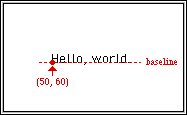
| Most graphical objects in Java use the upper left corner of the figure to define their location. Strings, however, work differently. The location at which a string is displayed is always taken to be at the leftmost edge of the first character along what is called the baseline, which is the line on which the uppercase letters sit. Some lowercase letters (g, j, p, q, and y) descend below the baseline, as do several special characters like the comma. The location of the start of the string and the concept of the baseline are illustrated in the diagram to the right. |
|
|
Unless you specify otherwise, a string is displayed in a standard
font, which is defined in this class as the constant
DEFAULT_FONT.
You can change the appearance, style, and size of the string by
using the setFont method,
which takes a Font as its argument, as defined in the
java.awt package. For example, to change the string
so that it uses a boldface serif type face at a larger point size,
you could execute the following code:
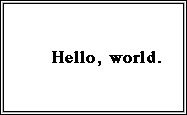
Note that changing the font can change the displayed size of the string, which will be reflected in calls to getWidth or getSize. |
|
|
Just as with other objects of the
GObject class,
you can change the color of the displayed text by invoking
the setColor method,
which takes a Color as its argument, as defined in the
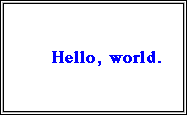
java.awt package. Thus, the following statement
changes the text color to blue:
|
|
|
Once installed on the canvas, you can move a string using either
the setLocation method,
which moves an object to a specific position,
or the translate method,
which moves an object relative to its current position.
To move the string rightward 50 pixels, for example, you could use
the following statement:
As you can see from the diagram, the string is clipped by the edges of the canvas. |

|
|
For a GString object, one of the operations you
will often want to perform is to center the string relative to a particular
position, such as the center of the screen. To do so, the simplest
approach is to use the getWidth
method to find the width of the string in pixels, and then start the
string half that distance to the left of the central point. Thus, the
following setLocation call
centers the string horizontally in the GCanvas:
|

|
|
As a final example, you can use the
setString method to
change the character string that the GString displays.
Thus, if you call
the string "Hello, world." gets replaced by "Hi!". The position of the string doesn’t change, so that you would then need to repeat the centering operation if you wanted this string to appear in the middle of the window. |

|
| Field Summary | |
| static Font | DEFAULT_FONT
|
| Constructor Summary |
| GString(String str)
|
| Method Summary | |
| double | getAscent()
|
| Rectangle | getBounds()
|
| double | getDescent()
|
| Font | getFont()
|
| FontMetrics | getFontMetrics()
|
| double | getHeight()
|
| Dimension | getSize()
|
| String | getString()
|
| double | getWidth()
|
| void | paint(Graphics g)
|
| void | setFont(Font font)
|
| void | setString(String str)
|
| Inherited Method Summary | |
| void | addMouseListener(MouseListener listener)
|
| void | addMouseMotionListener(MouseMotionListener listener)
|
| boolean | contains(double x,
double y)
|
| Color | getColor()
|
| Point | getLocation()
|
| double | getX()
|
| double | getY()
|
| boolean | isVisible()
|
| void | moveToBack()
|
| void | moveToFront()
|
| void | removeMouseListener(MouseListener listener)
|
| void | removeMouseMotionListener(MouseMotionListener listener)
|
| void | setColor(Color c)
|
| void | setLocation(double x,
double y)
|
| void | setVisible(boolean visible)
|
| void | translate(double dx,
double dy)
|
| Field Detail |
public static final Font DEFAULT_FONT| Constructor Detail |
public GString(String str)| Usage: | GString gstr = new GString(str); | ||
| Parameter: |
|
| Method Detail |
public double getAscent()| Usage: | double ascent = gstr.getAscent(); |
| Returns: | The ascent of this string in pixels |
public Rectangle getBounds()| Usage: | Rectangle bounds = gstr.getBounds(); |
| Returns: | The bounding box for this object |
public double getDescent()| Usage: | double descent = gstr.getDescent(); |
| Returns: | The descent of this string in pixels |
public Font getFont()| Usage: | Font font = gstr.getFont(); |
| Returns: | The font in use by this object |
public FontMetrics getFontMetrics()
public double getHeight()| Usage: | double height = gstr.getHeight(); |
| Returns: | The height of this string in pixels |
public Dimension getSize()| Usage: | Dimension size = gstr.getSize(); |
| Returns: | The size of this object |
public String getString()| Usage: | String str = gstr.getString(); |
| Returns: | The string displayed by this object |
public double getWidth()| Usage: | double width = gstr.getWidth(); |
| Returns: | The width of this object |
public void paint(Graphics g)
public void setFont(Font font)| Usage: | gstr.setFont(font); | ||
| Parameter: |
|
public void setString(String str)| Usage: | gstr.setString(str); | ||
| Parameter: |
|
|
|||||||
| PREV CLASS NEXT CLASS | FRAMES NO FRAMES | ||||||
| SUMMARY: FIELD | CONSTR | METHOD | DETAIL: FIELD | CONSTR | METHOD | ||||||