|
Options: Grades 1 to 5
The below descriptions
integrate text from software vendors' descriptions of the various products
and the website authors' commentary.
ToonTalk
 ToonTalk
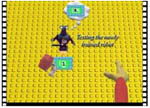
is both a programming language and a video game. The "Toon"
part stands for cartoon. The system's presentation is in the form of
animated characters, including robots that can be trained by example.
Inside of ToonTalk's animated world, students can build and run all
sorts of computer programs. While learning how to program they face
challenging puzzles, express their creativity, learn new ways to solve
problems, and have tons of fun. Programs can be constructed for an incredible
variety of purposes -- games, music, math, animation, simulation, science,
language, robotics, education. The process of building programs entails
a rich set of problem-solving skills involving analysis and design. ToonTalk
is both a programming language and a video game. The "Toon"
part stands for cartoon. The system's presentation is in the form of
animated characters, including robots that can be trained by example.
Inside of ToonTalk's animated world, students can build and run all
sorts of computer programs. While learning how to program they face
challenging puzzles, express their creativity, learn new ways to solve
problems, and have tons of fun. Programs can be constructed for an incredible
variety of purposes -- games, music, math, animation, simulation, science,
language, robotics, education. The process of building programs entails
a rich set of problem-solving skills involving analysis and design.
Used in: Lower School
Availability: Commercial
software --- $15.00 USD. Only available for Windows and Macintosh machines.
The
Incredible Toon Machine
 The
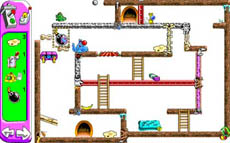
objective is to finish a series of Rube Goldberg contraptions with crucial
parts left out. The result is always some wild animation where the cute,
but not cuddly, creatures get anvils on the head and are singed by dragon
fire in order to get a chuckle out of you. The emphasis is puzzle-solving
and critical thinking, but the entertainment value is very high, which
is exactly what is needed to keep young children in lower school interested.
Whether students are watching cats gag on hairballs or elephants sneezing
their way through puzzle solutions, the young students will have a great
time straining their brains. The
objective is to finish a series of Rube Goldberg contraptions with crucial
parts left out. The result is always some wild animation where the cute,
but not cuddly, creatures get anvils on the head and are singed by dragon
fire in order to get a chuckle out of you. The emphasis is puzzle-solving
and critical thinking, but the entertainment value is very high, which
is exactly what is needed to keep young children in lower school interested.
Whether students are watching cats gag on hairballs or elephants sneezing
their way through puzzle solutions, the young students will have a great
time straining their brains.
Used in: Lower School
Availability: The software
is free. Only available for Windows and Macintosh machines.
Crayon
Physics Deluxe
 A
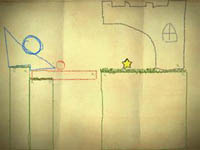
2D physics puzzle game, in which students experience what it would be
like if drawings would be magically transformed into real physical objects.
Students will solve puzzles with artistic vision and creative use of
physics. This application promotes puzzle solving and critical thinking.
It features a physics engine that allow the user to draw what ever they
want, as well as a huge number of level and an easy to use level editor. A
2D physics puzzle game, in which students experience what it would be
like if drawings would be magically transformed into real physical objects.
Students will solve puzzles with artistic vision and creative use of
physics. This application promotes puzzle solving and critical thinking.
It features a physics engine that allow the user to draw what ever they
want, as well as a huge number of level and an easy to use level editor.
Used in: Lower School
Availability: The software
is free. Only available for Windows machines.
Logo
 Logo
is a computer programming language used for functional programming.
It is an easier-to-read adaptation and dialect of the Lisp language.
It was created for educational use and has been used quite extensively
to teach computer science, math, geometry, etc. Today, it is known mainly
for its turtle graphics, but it also has significant facilities for
handling lists, files, I/O, and recursion. Logo can be used to teach
most computer science concepts. Logo
is a computer programming language used for functional programming.
It is an easier-to-read adaptation and dialect of the Lisp language.
It was created for educational use and has been used quite extensively
to teach computer science, math, geometry, etc. Today, it is known mainly
for its turtle graphics, but it also has significant facilities for
handling lists, files, I/O, and recursion. Logo can be used to teach
most computer science concepts.
Logo's best-known feature
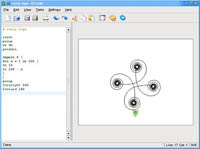
is the turtle, which is an on-screen cursor, which can be given movement
and drawing instructions, and is used to programmatically produce line
graphics. It is usually represented pictorially either as a triangle
or a turtle icon. The graphical portion of Logo is what makes it so
attractive for teaching computer science and programming to young students.
The graphical feedback both acts as a positive reinforcement, as well
as an easy debugging tool.
Used in: Lower School
Availability: Logo is free
and versions of it can be downloaded for Linux, Mac OS X, Microsoft
Windows, and other operating systems. In addition, Logo has been translated
into a large number of languages.
Game
Maker
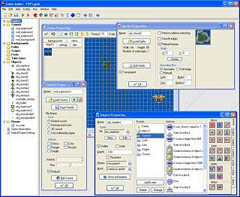 Game
Maker was written by Mark Overmars, a professor of the University of
Utrecht, partly as a teaching aid for his students. It is gaining recognition
as a useful teaching tool in primary and secondary schools because of
its easy entry and sophisticated scripting language. Game Maker will
teach students object oriented programming techniques with a simple
drag and drop interface that removes the need to learn a complex programming
language. The rewarding experience of creating your own finished product
- especially a game - will appeal widely to kids. This type of software
also allows collaboration and teamwork either in pairs or in teams of
up to four students. A game competition can easily be set up. Game
Maker was written by Mark Overmars, a professor of the University of
Utrecht, partly as a teaching aid for his students. It is gaining recognition
as a useful teaching tool in primary and secondary schools because of
its easy entry and sophisticated scripting language. Game Maker will
teach students object oriented programming techniques with a simple
drag and drop interface that removes the need to learn a complex programming
language. The rewarding experience of creating your own finished product
- especially a game - will appeal widely to kids. This type of software
also allows collaboration and teamwork either in pairs or in teams of
up to four students. A game competition can easily be set up.
Used in: Lower School &
Middle School
Availability: The software
is shareware. The basic edition is free. To license the full edition
for three computers costs $20 USD. Only available for Windows machines.
The
Incredible Machine
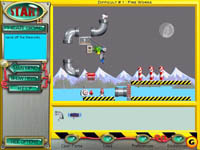 The
general objective of the Incredible Machine series of games is to create
a series of Rube Goldberg devices. Available objects range from simple
ropes and pulleys to electrical generators, bowling balls and even cats
and mice. Some levels have only one solution, whereas others have multiple
soultions and allow for user creativity. The software comes with hundreds
of levels and a sandbox mode that allows The
general objective of the Incredible Machine series of games is to create
a series of Rube Goldberg devices. Available objects range from simple
ropes and pulleys to electrical generators, bowling balls and even cats
and mice. Some levels have only one solution, whereas others have multiple
soultions and allow for user creativity. The software comes with hundreds
of levels and a sandbox mode that allows 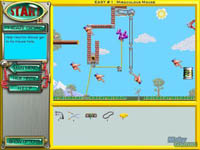 students
to create their own puzzles for others to solve. All of the levels use
the concepts of gravity, forces and cause and effect. The game is quite
challenging, and the puzzles gradually increase in difficulty. The game
encourages students to think out of the box. Like the Toon version of
the game, this application improves puzzle-solving and critical thinking
skills. There is a unique feeling of success after every level, which
is necessary for immersion and continued interest in an application.
The game includes tutorials and helpful messages that can be turned
on and off to help a student. In addition, the game lends itself well
to teamwork, i.e., students can work cooperativly to complete the levels. students
to create their own puzzles for others to solve. All of the levels use
the concepts of gravity, forces and cause and effect. The game is quite
challenging, and the puzzles gradually increase in difficulty. The game
encourages students to think out of the box. Like the Toon version of
the game, this application improves puzzle-solving and critical thinking
skills. There is a unique feeling of success after every level, which
is necessary for immersion and continued interest in an application.
The game includes tutorials and helpful messages that can be turned
on and off to help a student. In addition, the game lends itself well
to teamwork, i.e., students can work cooperativly to complete the levels.
Used in: Lower School &
Middle School
Availability: The software
is freeware. Only available for Windows and Macintosh machines.
Armadillo
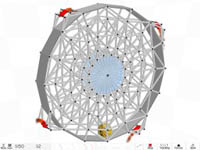 Armadillo
Run is a physics-based puzzle game that is very similar to the Incredible
Machine series. Students have to build structures with the purpose of
getting an armadillo to a certain point in space. There is a selection
of building materials, each with different properties, which can be
combined to form almost anything. Armadillo
Run is a physics-based puzzle game that is very similar to the Incredible
Machine series. Students have to build structures with the purpose of
getting an armadillo to a certain point in space. There is a selection
of building materials, each with different properties, which can be
combined to form almost anything.  The
realistic physics simulation gives students the freedom to solve each
level in many different ways, something now always available in the
Incredible Machine series. The
realistic physics simulation gives students the freedom to solve each
level in many different ways, something now always available in the
Incredible Machine series.
Used in: Lower School &
Middle School
Availability: The software
is commercial - $20 USD. Only available for Windows machines.
GCompris
 A
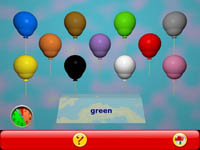
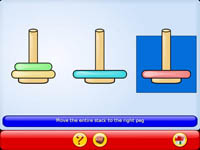
suite of educational software for children aged 2 to 10. The name GCompris
comes from the French "J'ai compris," French for "I have
understood." GCompris includes over 100 activities related to A
suite of educational software for children aged 2 to 10. The name GCompris
comes from the French "J'ai compris," French for "I have
understood." GCompris includes over 100 activities related to
- Computer discovery: keyboard,
mouse, different mouse gestures
- Algebra: table memory,
enumeration, double entry table, mirror images
- Science: the canal lock,
the water cycle, the submarine, electric simulations
- Geography: place the country
on the map
 Games:
chess, memory, Connect Four, mancala, sudoku Games:
chess, memory, Connect Four, mancala, sudoku - Reading: reading practice
- Other: learn to tell time,
puzzle of famous paintings, vector drawing, cartoon making
Used in: Primarily Pre-K
and Kindergarten; also in 1st to 3rd grade
Availability: The software
is free and is available for Linux, Mac OS X, Microsoft Windows and
other systems. In addition, the software is available in 23 languages.
Math
Blaster for Kindergarten to 5th Grade
 This
software package teaches mathematics concepts. With robots controlling
the galaxy, the universe is counting on the user to save the day. Defend
the human race, and defeat the robots in a fast-paced, action-packed
adventure. Children can achieve confidence and speed in subjects such
as Addition, Subtraction, Multiplication, Division, Mental Math, Fact
Families, Equivalents, and Mental Math. Unlike GCompris this software
is not free so it is encouraged, but not necessary. This
software package teaches mathematics concepts. With robots controlling
the galaxy, the universe is counting on the user to save the day. Defend
the human race, and defeat the robots in a fast-paced, action-packed
adventure. Children can achieve confidence and speed in subjects such
as Addition, Subtraction, Multiplication, Division, Mental Math, Fact
Families, Equivalents, and Mental Math. Unlike GCompris this software
is not free so it is encouraged, but not necessary.
Used in: Kindergarten and
Lower School
Availability: Commercial
software --- $20-$30 USD for one grade. Only available for Windows and
Macintosh machines.
Reading
Blaster for Kindergarten to 5th Grade
 This
software package teaches reading and comprehension concepts. Students
develop critical thinking skills as they learn to read for details,
find the main idea, make inferences, draw conclusions, and build reading
vocabularies. Using context clues and parts of speech rules, students
discover word meanings and build reading comprehension skills. This
software is strongly aligned with NCTE and IRA Standards. Unlike GCompris
this software is not free so it is encouraged, but not necessary. This
software package teaches reading and comprehension concepts. Students
develop critical thinking skills as they learn to read for details,
find the main idea, make inferences, draw conclusions, and build reading
vocabularies. Using context clues and parts of speech rules, students
discover word meanings and build reading comprehension skills. This
software is strongly aligned with NCTE and IRA Standards. Unlike GCompris
this software is not free so it is encouraged, but not necessary.
Used in: Kindergarten and
Lower School
Availability: Commercial
software --- $20-$30 USD for one grade. Only available for Windows and
Macintosh machines.
|